
From HTML, JavaScript, CSS & Tailwind to React: An E-commerce Deployment
How I migrated CarryHub — a curated tech-accessories store — from static HTML, CSS, JavaScript and Tailwind into a fully interactive React e-commerce app, and deployed it.
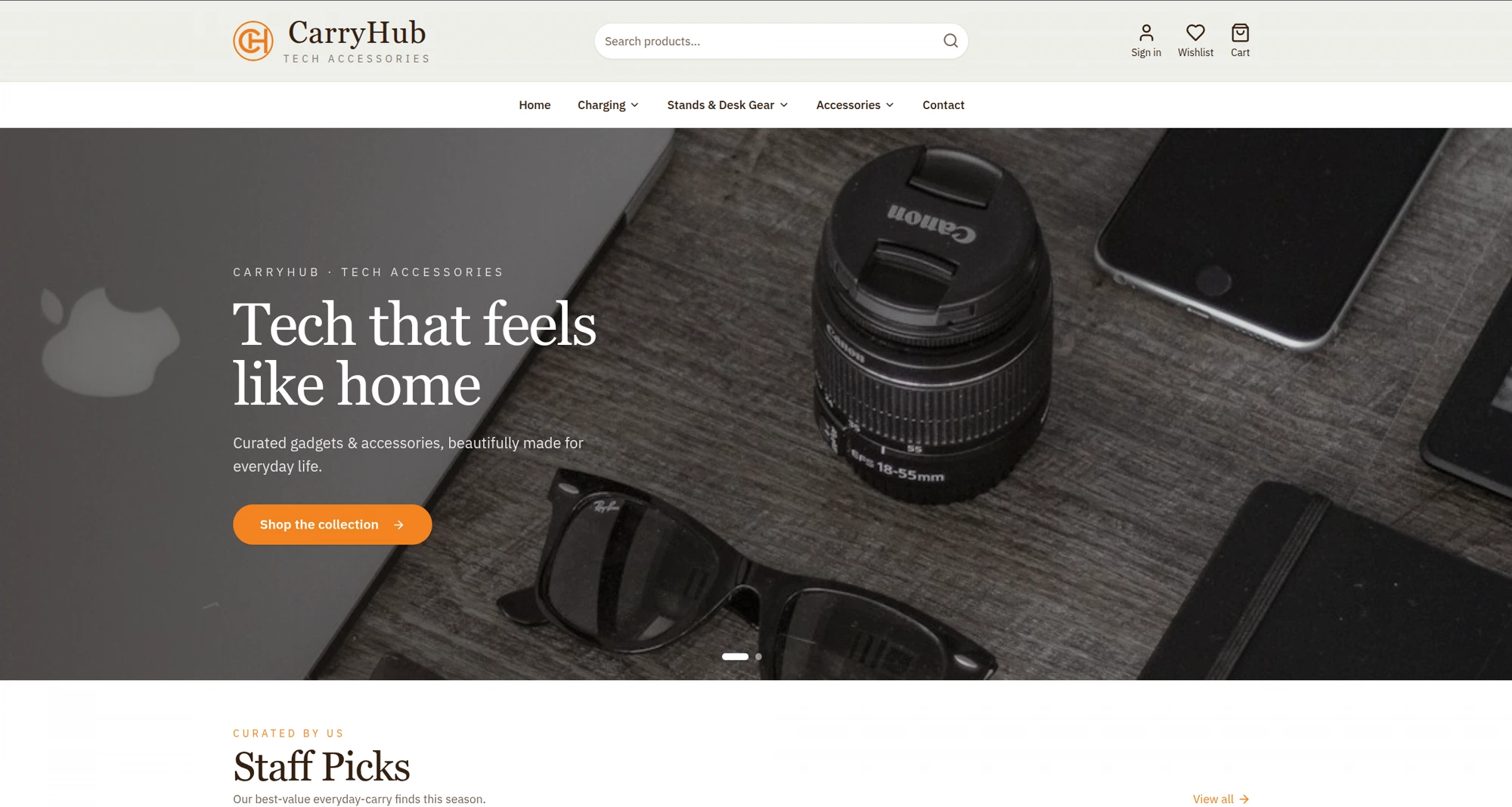
Most real-world projects don't start on a framework — they start with an idea and whatever tools get it on screen fastest. CarryHub, a curated tech-accessories store, began exactly that way: hand-written HTML, CSS, and vanilla JavaScript, later tidied up with Tailwind CSS. It looked great. Then it needed to behave like a real store — a cart, a wishlist, filtering, categories, a checkout flow — and that's where a static site quietly hits its ceiling. This is the story of migrating CarryHub from static pages to a React e-commerce app, and deploying it.
Where it started: HTML, CSS, JavaScript + Tailwind
The first version of CarryHub was a set of static HTML files. Tailwind made the styling fast and consistent — utility classes meant no fighting with a growing stylesheet, and the "Tech that feels like home" hero, the category tiles, and the product grid all came together quickly.
For a brochure site, this stack is honestly hard to beat: it's fast, cheap to host, and has zero build complexity. The trouble starts the moment the site needs state and interactivity that spans pages:
- The cart and wishlist had to remember items as the shopper moved between Home, a category, and a product page.
- The product grid needed live filters — All · Best Sellers · On Sale · Trending — without a full page reload.
- The hero rotated between "Tech that feels like home" and "Power, anywhere you wander."
- Menus like Charging, Stands & Desk Gear, and Accessories repeated on every page and had to stay in sync.
In plain JavaScript, each of these becomes manual DOM surgery: querySelector, event listeners, and hand-written code to keep the cart badge, the wishlist, and the UI agreeing with each other. Duplicated markup across pages meant every header tweak had to be copied everywhere. It works — until it doesn't scale.
Why React was the right move
React solves the exact problems a growing store runs into:
- Components kill duplication. The header, product card, category menu, and footer become single reusable components. Change the cart icon once; it updates everywhere.
- State is declarative. Instead of manually toggling the DOM, you describe what the UI should look like for a given cart, and React keeps the screen in sync. Add to cart → the badge, drawer, and totals just update.
- Client-side routing feels instant. Moving between Home → Charging & Power → a product page happens without a white flash or reload.
- The data and the view are separate. Products become plain data; the grid, the filters, and the "New Arrivals" row all render from that same source.
Crucially, Tailwind came along for the ride. One of the nicest parts of the migration is that the styling didn't get thrown away — Tailwind classes drop straight into JSX. The visual language of CarryHub survived the rewrite intact.
The migration, step by step
Rather than a big-bang rewrite, the move was incremental and low-risk:
1. Recreate the layout as components. The static header, hero, category tiles, product card, testimonials, and footer each became a React component. The existing Tailwind markup pasted almost directly into JSX (mostly swapping class for className).
2. Turn products into data. Every product — image, name, price, badges like Best Seller or On Sale — became an entry in a data array. The grid now .map()s over that data, so adding a product is a one-line change instead of copy-pasting HTML.
3. Add real state for cart & wishlist. A small amount of shared state (via context) holds the cart and wishlist, persisted to localStorage so a refresh doesn't empty the bag. The cart badge, the wishlist heart, and the drawer all read from one source of truth.
4. Wire up routing & filtering. Client-side routes power Home, the category pages (Charging, Stands & Desk Gear, Accessories), and product pages. The All / Best Sellers / On Sale / Trending tabs simply filter the product array — no reloads.
5. Keep the polish. The rotating hero, the "Bundle & save 10%" desk-setup promo, the trust badges (Free Shipping over $50, Secure Payment, 24/7 Support), and customer reviews all carried over — now as components that are trivial to reuse and reorder.
Deploying the e-commerce build
Because CarryHub compiles to static assets, deployment stays refreshingly simple. The React app is built into an optimized production bundle and served over a CDN, which keeps it fast and cheap while giving shoppers an app-like experience. A few things I made sure of before shipping:
- Performance: images are compressed (WebP) and lazy-loaded, so the product grid stays quick even on mobile.
- Responsive by default: the layout works from phone to desktop — the same store, comfortably tappable everywhere.
- SEO basics: meaningful titles, descriptions, and a clean URL for every category and product so the store is discoverable.
- Resilience: cart and wishlist survive refreshes; empty and loading states are handled instead of blank screens.
What the migration bought us
The end result looks like the original CarryHub — the same warm, editorial design — but it now behaves like a proper storefront:
- Adding a product is a data change, not an HTML copy-paste.
- The cart and wishlist are consistent and persistent across the whole site.
- Navigation is instant, and the codebase is far easier to extend (payments, accounts, inventory can slot in next).
The lesson: static HTML, CSS, JavaScript, and Tailwind are a fantastic starting point — and often the right choice for simple sites. But once you need shared state and interactivity across pages, React turns a fragile pile of scripts into a maintainable application, without forcing you to abandon the design you already love. You can see the finished store at carryhubs.com.

From Design to Build: Catherine's Personal Portfolio Website
View in portfolioMore in Web Development


You might also like
Never miss a post
Get new cybersecurity and networking write-ups straight to your inbox. No spam — unsubscribe anytime.