
Allowing ICMP Traffic Through the Cisco ASA Firewall
Why ping dies at the Cisco ASA — and how to fix it. Enabling ICMP inspection across a dual-EIGRP GNS3 lab, with the config and the verification tests.
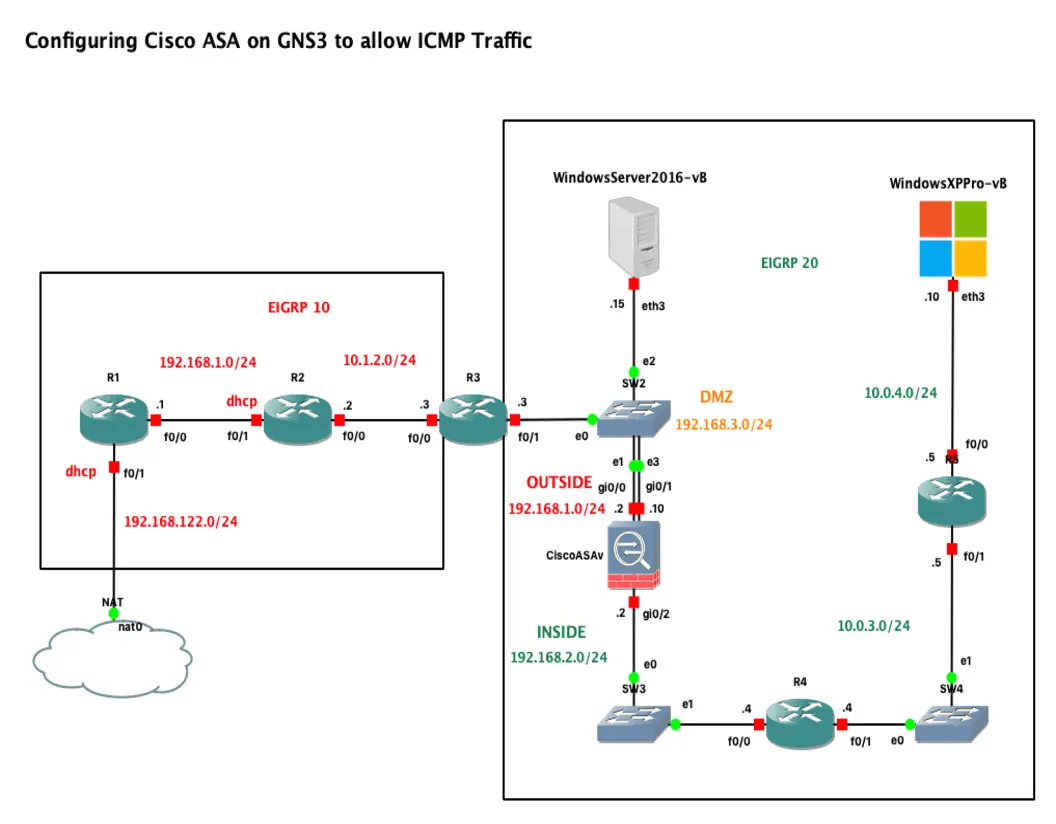
Why ICMP Matters on Cisco ASAv
ICMP is often treated as "just ping," but on a firewall it plays a much bigger role. On Cisco ASAv, ICMP affects:
- Basic reachability testing
- Path MTU discovery
- Traceroute behavior
- Error reporting between hosts
- Operational troubleshooting and monitoring
If ICMP is blocked too aggressively, applications may behave unpredictably even when TCP and UDP appear to be allowed. If it is allowed too broadly, the firewall may expose unnecessary visibility to untrusted networks.
A good ASAv configuration balances functionality and control.
How ASAv Handles ICMP
Unlike TCP or UDP, ICMP is not session-oriented in the traditional sense. That changes how the firewall evaluates it.
On Cisco ASAv:
- ICMP can be permitted or denied with ACLs
- ICMP can be statefully handled using inspection policies
- Different ICMP types can be allowed selectively
- Interface security levels still influence default behavior, but ACLs and policy rules are what matter in real deployments
In practice, the most important distinction is this:
- Permitting ICMP with an ACL allows specific ICMP packets through
- Inspecting ICMP allows the firewall to track ICMP flows and permit related return traffic more intelligently
Common ICMP Types You Should Know
Before configuring rules, it helps to understand the ICMP message types you are likely to see.
Some common examples:
- echo — ping request
- echo-reply — ping response
- unreachable — destination unreachable
- time-exceeded — used in traceroute and TTL expiry handling
- source-quench — obsolete, generally not used
- redirect — route redirection, usually restricted in secure environments
On ASAv, you can match ICMP by name or by type/code depending on the configuration style.
Basic ACL-Based ICMP Allow Rule
A common requirement is to allow internal users to ping an external host, or to allow a management host to ping a firewall-facing address.
For example, to permit ICMP echo from an inside subnet to any destination:
access-list INSIDE-IN extended permit icmp 10.10.10.0 255.255.255.0 any echo
access-group INSIDE-IN in interface inside
This rule allows ICMP echo requests from the 10.10.10.0/24 subnet out of the inside interface.
If you also want to explicitly allow echo replies back through an outside ACL in a non-inspected scenario, you might add:
access-list OUTSIDE-IN extended permit icmp any 10.10.10.0 255.255.255.0 echo-reply
access-group OUTSIDE-IN in interface outside
However, this is often not the preferred design if ICMP inspection is available, because inspection reduces the need for broad inbound reply rules.
Using ICMP Inspection for Stateful Handling
On ASAv, ICMP inspection is typically configured through the Modular Policy Framework (MPF). This is the recommended approach when you want the firewall to treat ICMP in a more state-aware manner.
Example: Enable ICMP Inspection
policy-map global_policy
 class inspection_default
  inspect icmp
Then ensure the global policy is applied:
service-policy global_policy global
With ICMP inspection enabled, the firewall can allow return ICMP traffic associated with permitted requests, which simplifies rule design and improves control.
This is especially useful for:
- Internal hosts pinging external systems
- Monitoring tools that rely on ICMP
- Reducing excessive inbound ACL exceptions
Allowing Ping to the ASAv Interface Itself
There is an important difference between allowing ICMP through the firewall and allowing ICMP to the firewall interface.
If you want the ASAv interface to respond to ping, use the icmp command to define which hosts or networks may ping a specific interface.
Example:
icmp permit 10.10.10.0 255.255.255.0 inside
icmp permit 192.0.2.10 255.255.255.255 outside
This permits:
- Hosts on
10.10.10.0/24to ping theinsideinterface - The external host
192.0.2.10to ping theoutsideinterface
This does not automatically allow transit ICMP traffic through the firewall. It only controls whether the firewall itself responds.
Restricting ICMP by Source
A strong security practice is to allow ICMP only from trusted management or monitoring sources.
For example, instead of allowing any external host to ping the outside interface, restrict it:
icmp permit 198.51.100.25 255.255.255.255 outside
icmp deny any outside
This approach helps reduce:
- Internet-wide discovery
- Unnecessary attack surface exposure
- Noise in firewall logs
For production deployments, avoid blanket ICMP exposure on public interfaces unless there is a clear operational need.
Permitting Specific ICMP Types Only
You do not always need to allow all ICMP traffic. Often, only a few types are necessary.
Example: permit echo requests from a monitoring station to a DMZ host:
access-list OUTSIDE-IN extended permit icmp host 198.51.100.25 host 172.16.50.10 echo
access-group OUTSIDE-IN in interface outside
Example: permit ICMP unreachable messages back to internal hosts if required by policy design:
access-list OUTSIDE-IN extended permit icmp any 10.10.10.0 255.255.255.0 unreachable
Being selective gives you tighter control than a generic permit statement.
Example Scenario: Internal Users Ping the Internet
Consider this simple topology:
inside:10.10.10.0/24outside: public connectivity- Requirement: internal users can ping Internet hosts, and replies should work cleanly
Option 1: ACL + ICMP Inspection
Permit outbound echo requests from inside:
access-list INSIDE-IN extended permit icmp 10.10.10.0 255.255.255.0 any echo
access-group INSIDE-IN in interface inside
Enable ICMP inspection:
policy-map global_policy
 class inspection_default
  inspect icmp
service-policy global_policy global
This is the cleaner design in many environments.
Option 2: Explicit ACLs in Both Directions
If inspection is not used, you may need more explicit control:
access-list INSIDE-IN extended permit icmp 10.10.10.0 255.255.255.0 any echo
access-list OUTSIDE-IN extended permit icmp any 10.10.10.0 255.255.255.0 echo-reply
access-group INSIDE-IN in interface inside
access-group OUTSIDE-IN in interface outside
This works, but is usually less elegant and can become harder to maintain at scale.
Example Scenario: Monitoring a DMZ Server
Suppose an external monitoring platform must ping a DMZ server.
- Monitoring host:
198.51.100.25 - DMZ server:
172.16.50.10
Configuration:
access-list OUTSIDE-IN extended permit icmp host 198.51.100.25 host 172.16.50.10 echo
access-group OUTSIDE-IN in interface outside
If NAT is involved, make sure the ACL references the correct address format for your software version and NAT model. In ASA/ASAv environments, ACL behavior with translated versus real addresses depends on version and rule context, so always validate against your running release.
ICMP and NAT Considerations
ICMP and NAT can create confusion during testing.
Things to keep in mind:
- A host behind ASAv may send ICMP using a translated public address
- ACL matching may depend on whether ASAv expects real or mapped addresses
- Packet-tracer is extremely useful for validating NAT and ACL interaction
- ICMP inspection can simplify return-path handling, but NAT still must be correct
Useful validation command:
packet-tracer input inside icmp 10.10.10.10 8 0 8.8.8.8 detailed
This simulates an ICMP echo packet from 10.10.10.10 to 8.8.8.8 and shows:
- ACL evaluation
- NAT processing
- Route lookup
- Policy inspection decisions
- Final permit or drop result
Troubleshooting ICMP on ASAv
When ICMP does not behave as expected, check the firewall in layers.
1. Verify Interface ACLs
Display the ACLs and hit counts:
show access-list
Look for:
- Whether the expected rule exists
- Whether hit counters increase during testing
- Whether a more specific deny is matching first
2. Check Service Policy Inspection
Confirm ICMP inspection is active:
show service-policy
You should see ICMP inspection under the applied global or interface policy.
3. Test with Packet-Tracer
This is one of the fastest ways to isolate policy issues:
packet-tracer input outside icmp 198.51.100.25 8 0 172.16.50.10 detailed
This helps answer:
- Did the ACL permit it?
- Did NAT translate correctly?
- Was the packet dropped by policy?
- Which processing phase caused failure?
4. Review Connection and ASP Drop Information
For deeper troubleshooting, inspect drop reasons:
show asp drop
You can also use captures to observe live traffic.
5. Use Packet Captures
Example captures on ASAv:
capture CAPIN interface outside match icmp host 198.51.100.25 host 172.16.50.10
capture CAPOUT interface dmz match icmp host 198.51.100.25 host 172.16.50.10
show capture CAPIN
show capture CAPOUT
This helps confirm whether packets:
- Reached the ingress interface
- Passed through the firewall
- Returned properly
Security Best Practices for ICMP Control
ICMP should not simply be set to "allow all" or "deny all." A more disciplined approach works better.
Recommended practices:
- Allow only the ICMP types you actually need
- Restrict source IPs for management and monitoring access
- Use ICMP inspection where appropriate
- Avoid exposing public interface responses unless operationally necessary
- Log and review denied traffic during rollout
- Validate NAT and ACL behavior with packet-tracer
- Document which monitoring systems require ICMP access
In many environments:
- Inside to outside ICMP is commonly permitted with inspection
- Outside to inside ICMP is tightly limited
- Ping to the firewall itself is restricted to administrators and monitoring platforms
Common Mistakes
These are some of the most frequent ICMP configuration issues on ASAv:
- Allowing ping to the firewall interface but forgetting transit ACL rules
- Creating ACL permits but not applying them with
access-group - Enabling ACL rules without considering NAT behavior
- Forgetting to enable
inspect icmpwhen relying on stateful return handling - Permitting all ICMP types from untrusted networks
- Testing only with ping and ignoring traceroute or PMTU-related ICMP needs
A firewall can appear to "mostly work" while still breaking important ICMP-dependent functions in subtle ways.
A Practical Minimal Configuration Pattern
For many small to medium deployments, this is a reasonable starting point:
- Permit inside users to send ICMP echo
- Enable ICMP inspection
- Permit ping to firewall interfaces only from trusted management networks
- Deny unnecessary external ICMP exposure
Example:
access-list INSIDE-IN extended permit icmp 10.10.10.0 255.255.255.0 any echo
access-group INSIDE-IN in interface inside

policy-map global_policy
 class inspection_default
  inspect icmp
service-policy global_policy global

icmp permit 10.10.10.0 255.255.255.0 inside
icmp permit 192.0.2.10 255.255.255.255 outside
icmp deny any outside
This gives you:
- Internal diagnostic capability
- Cleaner return traffic handling
- Limited exposure of the firewall itself
Final Thoughts
ICMP on Cisco ASAv is simple in concept but easy to misconfigure in practice. The key is understanding the difference between:
- Traffic to the firewall
- Traffic through the firewall
- Stateless ACL permits versus state-aware inspection
If you design ICMP policy deliberately, you can preserve troubleshooting visibility and network functionality without weakening your security posture.
For most environments, the winning formula is:
- Use narrow ACLs
- Enable ICMP inspection where appropriate
- Limit who can ping the firewall itself
- Validate everything with
packet-tracerand captures
That approach keeps ICMP useful, predictable, and secure.

Cisco Router Hardening: A Baseline for Maximum Performance & Security
View in portfolioMore in Networking



You might also like
Never miss a post
Get new cybersecurity and networking write-ups straight to your inbox. No spam — unsubscribe anytime.