
Cisco ASAv Multi-DMZ Configuration and RIP Routing Architecture
A hands-on Cisco ASAv lab: stand up two isolated DMZ segments, publish a web server safely, contain the blast radius with security levels and ACLs, and run a RIPv2 routing architecture across the inside LAN — full config plus the tests that prove it works.
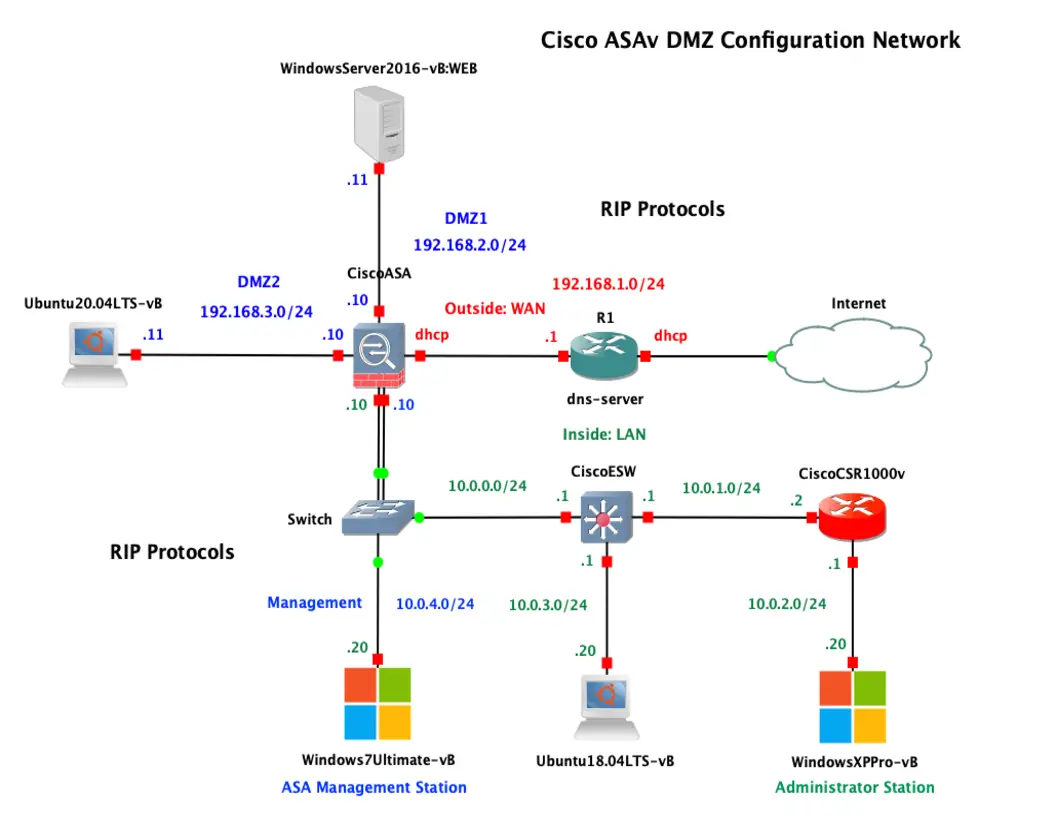
A DMZ (demilitarized zone) is the single most useful pattern in perimeter security: a semi-trusted segment where you place the services that must be reachable from the internet — a web server, a mail relay, a public API — without ever exposing your internal LAN. In this lab I build exactly that with a Cisco ASAv firewall, two DMZ segments, a routed WAN edge, and a full internal network running RIP. Here is how the ASA decides what gets in, what gets out, and what stays locked away.
The topology at a glance
The ASAv sits at the centre with four logical zones hanging off it — one WAN edge, one trusted inside LAN, and two isolated DMZs:
Everything downstream of the ASA's inside interface exchanges routes with RIP, while the outside edge (R1) hands the ASA its WAN address by DHCP and forwards to the internet.
Addressing plan
| Zone | Network | ASA interface IP | Key host |
|---|---|---|---|
| Outside (WAN) | 192.168.1.0/24 | .10 (DHCP) | R1 gateway .1 / DNS |
| DMZ1 | 192.168.2.0/24 | .10 | Windows Server 2016 WEB .11 |
| DMZ2 | 192.168.3.0/24 | .10 | Ubuntu 20.04 .11 |
| Inside (LAN) | 10.0.0.0/24 | .10 | Switch → ESW / CSR1000v |
| Management | 10.0.4.0/24 | — | Windows 7 (ASA Mgmt) .20 |
The core concept: security levels
Everything the ASA does starts with one number per interface — the security level, from 0 (least trusted) to 100 (most trusted).
- inside = 100 — your LAN, fully trusted.
- dmz1 / dmz2 = 50 — semi-trusted; reachable from outside but can't reach inside.
- outside = 0 — the internet, untrusted.
The golden rule: traffic flows freely from higher to lower security, and is denied from lower to higher — unless an access-list explicitly permits it. That single rule is what makes a DMZ a DMZ.
So inside (100) → dmz (50) and inside → outside (0) are allowed by default. But outside (0) → dmz (50) and dmz → inside (100) are blocked until you write a rule. That is precisely the behaviour we want: the world can reach the web server, the web server cannot turn around and reach your workstations.
Step 1 — Name and number the interfaces
Each physical interface gets a name (nameif), a security level, and an IP. The outside pulls its address from R1 via DHCP; the rest are static.
interface GigabitEthernet0/0 nameif outside security-level 0 ip address dhcp setroute no shutdown
interface GigabitEthernet0/1 nameif inside security-level 100 ip address 10.0.0.10 255.255.255.0 no shutdown
interface GigabitEthernet0/2 nameif dmz1 security-level 50 ip address 192.168.2.10 255.255.255.0 no shutdown
interface GigabitEthernet0/3 nameif dmz2 security-level 50 ip address 192.168.3.10 255.255.255.0 no shutdown
ip address dhcp setroute is the small but important detail — it installs a default route learned from R1 so the ASA knows how to reach the internet.
Step 2 — Let the inside reach the world with NAT
Internal hosts use private space, so we translate everything leaving toward the outside behind the ASA's WAN address (PAT / "hide NAT").
object network INSIDE-NET subnet 10.0.0.0 255.0.0.0 nat (inside,outside) dynamic interface
Now any workstation on the LAN can browse out, sharing the single public-facing address on the outside interface.
Step 3 — Publish the DMZ web server (the part everyone gets wrong)
We want the internet to reach the Windows Server 2016 web host in DMZ1 on ports 80/443 — and nothing else. That takes two pieces working together: a static NAT so the server has a reachable address, and an ACL so the firewall actually permits the flow (remember: outside→dmz is low→high, denied by default).
object network WEB-SERVER host 192.168.2.11 nat (dmz1,outside) static interface service tcp 80 80
access-list OUTSIDE-IN extended permit tcp any host 192.168.2.11 eq www access-list OUTSIDE-IN extended permit tcp any host 192.168.2.11 eq https access-list OUTSIDE-IN extended deny ip any any access-group OUTSIDE-IN in interface outside
The static NAT gives the web server a routable front door; the ACL cracks that door open for HTTP/HTTPS only and slams it on everything else with an explicit deny ip any any you can log.
Step 4 — Contain the DMZ (this is the whole point)
Because both DMZ interfaces sit at security level 50, they can already reach the outside (lower). What we must stop is a compromised DMZ host pivoting into the trusted LAN. Deny DMZ→inside explicitly, and while we're at it, keep the two DMZs from talking to each other.
access-list DMZ1-IN extended deny ip 192.168.2.0 255.255.255.0 10.0.0.0 255.0.0.0 access-list DMZ1-IN extended deny ip 192.168.2.0 255.255.255.0 192.168.3.0 255.255.255.0 access-list DMZ1-IN extended permit ip any any access-group DMZ1-IN in interface dmz1
Now if an attacker pops the web server, they are stranded: they can talk to the internet (already assumed hostile) but every packet toward 10.0.0.0/8 or the sister DMZ is dropped at the firewall. That is the blast-radius containment a DMZ exists to provide.
Step 5 — Dynamic routing with RIP on the inside
The internal network is multi-segment — the switch fans out to the CiscoESW (10.0.1.0/24), a CSR1000v (10.0.2.0/24), and management/admin subnets. Rather than static routes everywhere, the inside runs RIPv2 so the ASA and the internal routers learn each other's networks automatically.
router rip network 10.0.0.0 version 2 no auto-summary passive-interface outside
version 2gives us classless updates (essential with these /24s).no auto-summarystops RIP from collapsing them back to a classful 10.0.0.0/8.passive-interface outsideis a security must — we never leak internal routing adverts toward the WAN.
Step 6 — Verify it actually behaves
Configuration is a hypothesis; verification is the proof. The commands I lean on:
show interface ip brief ! did every interface come up with the right IP? show nat ! are the translations built (and hit counters climbing)? show access-list OUTSIDE-IN ! which ACE is matching inbound web traffic? show route ! did DHCP install a default route + did RIP learn the inside nets? show conn ! live connection table — the stateful heart of the ASA
Then the real tests, from the right vantage points:
- From the Administrator Station (WinXP, 10.0.2.20): browse out to the internet — should work (inside→outside).
- From the internet side: hit the web server's public address on 80/443 — should work; try any other port — should fail.
- From the web server in DMZ1: try to reach a workstation on
10.0.x.x— should be denied. If this succeeds, your containment is broken.
If test 3 ever passes, stop and fix your DMZ ACL before anything else. A DMZ that can reach the LAN is just an expensive extra hop for an attacker.
Why this design holds up
The elegance of the ASA model is that security is positional, not per-rule. By placing the web server at level 50 you get the correct default posture almost for free: the world reaches it, it reaches the world, and it cannot climb into your LAN. The ACLs only exist to punch the two deliberate holes (inbound 80/443) and to make containment explicit and loggable. Layer RIP underneath for hands-off internal routing and DHCP at the edge for a self-configuring WAN, and you have a compact, realistic enterprise perimeter you can build in a home lab.
Segment first, then permit the minimum — and always verify from the attacker's chair, not just your own.
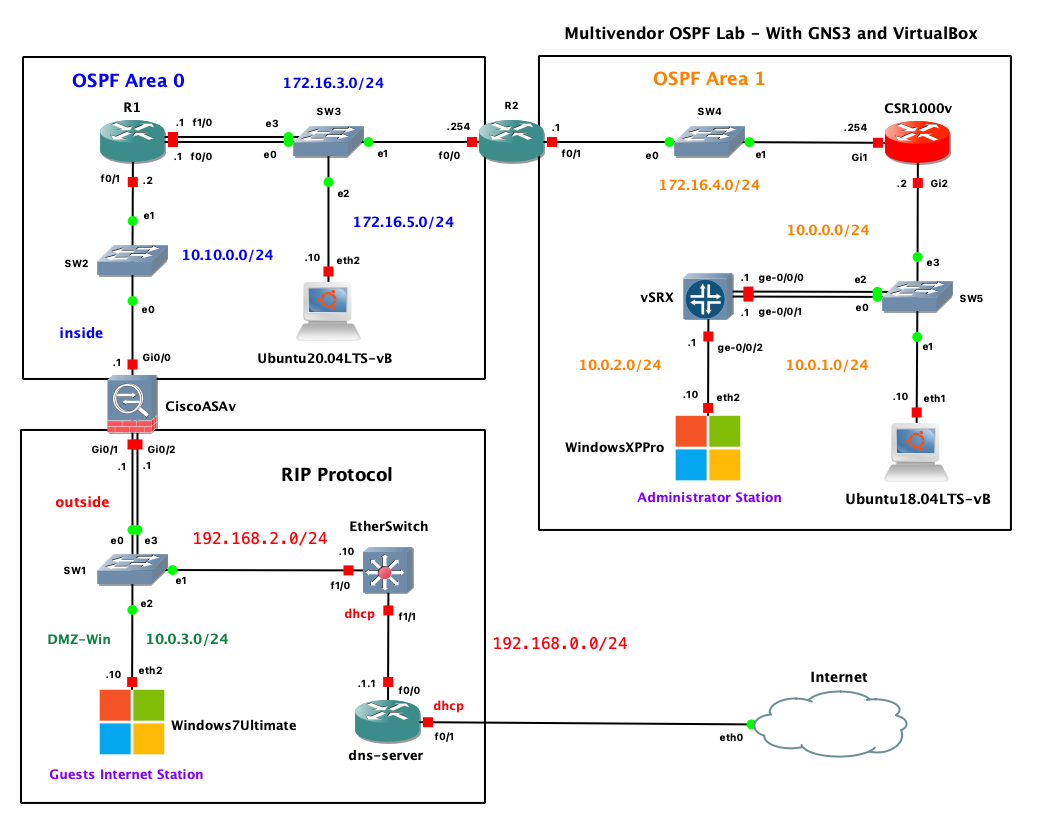
Multi-Area OSPF in GNS3: A Cisco + Juniper Multivendor Lab
View in portfolioMore in Networking


You might also like
Never miss a post
Get new cybersecurity and networking write-ups straight to your inbox. No spam — unsubscribe anytime.