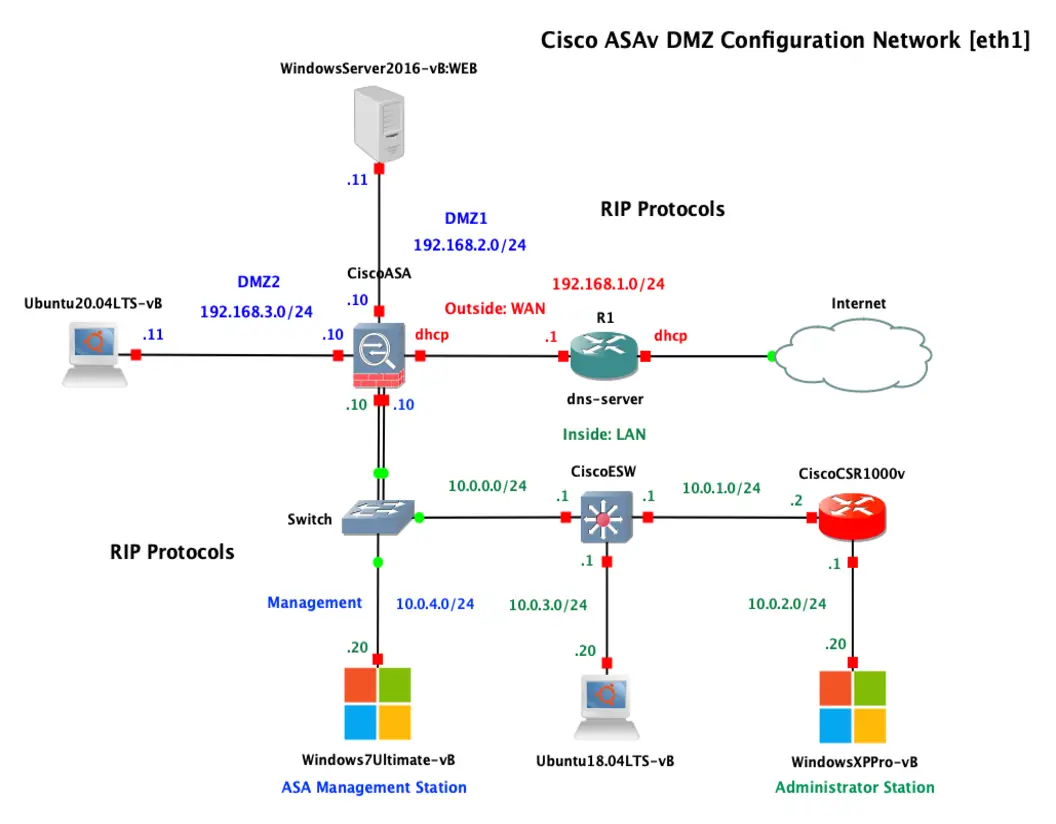
Designing Cisco ASAv Firewall with DMZ Segmentation
This networking project designs and implements a Cisco ASAv firewall deployment with a dedicated DMZ segment and supporting network services
Introduction
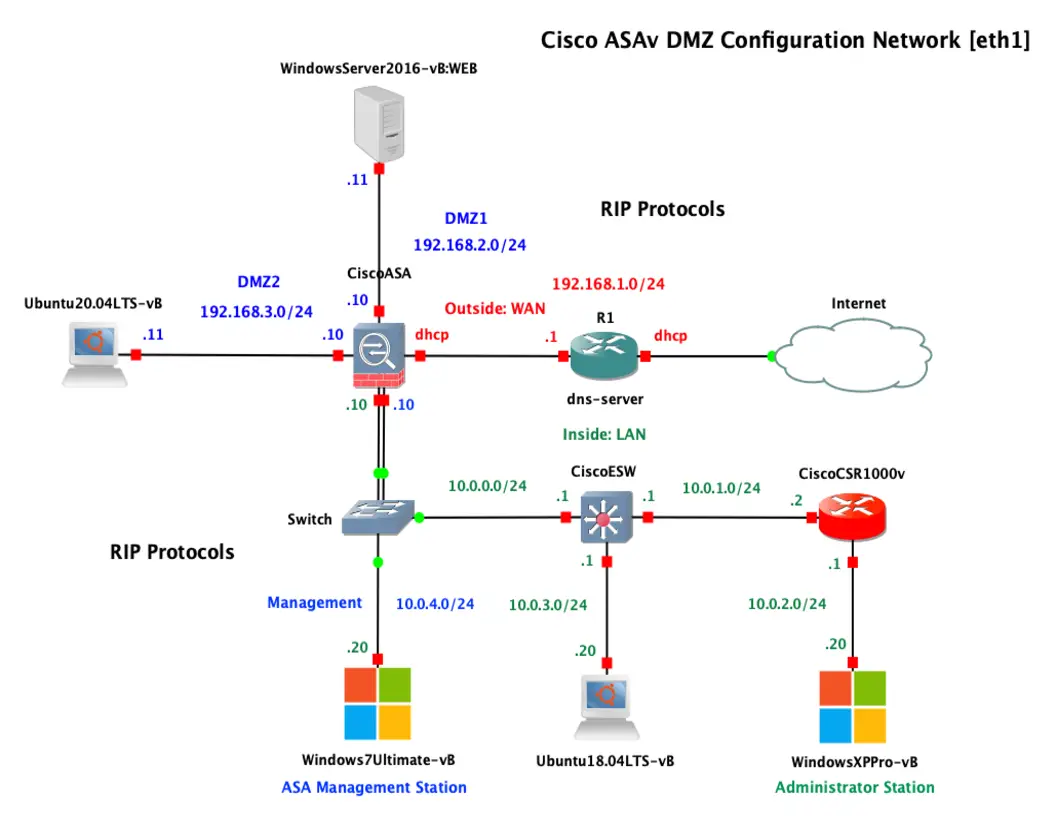
A demilitarized zone, or DMZ, is a segmented network that hosts public-facing services while reducing direct exposure to the internal LAN. In many enterprise and lab environments, Cisco ASAv is a flexible way to implement this design because it brings ASA firewall features into virtualized infrastructure.
This post walks through a practical Cisco ASAv and DMZ configuration. The goal is to build a simple but realistic topology with:
- An outside interface connected to the internet or upstream network
- An inside interface for trusted users and servers
- A DMZ interface for public-facing systems
- NAT and ACLs to tightly control traffic
- Basic verification and hardening steps
The examples use classic ASA-style CLI and are suitable for labs, proof-of-concept deployments, and foundational production designs.
Why Use a DMZ with ASAv
A DMZ adds a security boundary between untrusted and trusted networks. Instead of placing a public web server directly inside the LAN, you place it on a separate segment with restricted access.
Key benefits include:
- Reduced blast radius if a public server is compromised
- Controlled access paths between internet, DMZ, and inside
- Cleaner policy design using interface security levels and ACLs
- Better visibility for logging, NAT, and inspection
ASAv is especially useful when:
- Your infrastructure is virtualized in VMware, Hyper-V, KVM, or cloud environments
- You need ASA features without physical hardware
- You want to test firewall and segmentation policies in a lab
Example Topology
The following logical topology will be used:
- Outside:
203.0.113.2/30 - Inside:
192.168.10.1/24 - DMZ:
192.168.20.1/24 - Upstream gateway:
203.0.113.1 - Internal host:
192.168.10.10 - DMZ web server:
192.168.20.10
Traffic goals:
- Inside users can reach the internet
- Internet users can access the DMZ web server on HTTP/HTTPS
- Internet users cannot directly access the inside network
- Inside users can manage or reach the DMZ as required
- DMZ hosts should have limited access to the inside network
Security Levels and Traffic Flow
ASA uses security levels on interfaces:
insideis typically100dmzis commonly set to something like50outsideis typically0
By default:
- Traffic from higher to lower security levels is permitted
- Traffic from lower to higher is denied
- NAT and ACL logic still matter for real-world access control
This default behavior is helpful, but you should not rely on it alone. A proper DMZ design uses:
- Explicit ACLs
- Intentional NAT rules
- Restricted management access
- Logging and verification
Base ASAv Interface Configuration
Start by naming interfaces, assigning security levels, and setting IP addresses.
enable
configure terminal

interface GigabitEthernet0/0
 nameif outside
 security-level 0
 ip address 203.0.113.2 255.255.255.252
 no shutdown

interface GigabitEthernet0/1
 nameif inside
 security-level 100
 ip address 192.168.10.1 255.255.255.0
 no shutdown

interface GigabitEthernet0/2
 nameif dmz
 security-level 50
 ip address 192.168.20.1 255.255.255.0
 no shutdown
Next, define a default route toward the upstream gateway.
route outside 0.0.0.0 0.0.0.0 203.0.113.1
Object Definitions
Network objects make NAT and policy configuration easier to read and maintain.
object network INSIDE-NET
 subnet 192.168.10.0 255.255.255.0

object network DMZ-NET
 subnet 192.168.20.0 255.255.255.0

object network DMZ-WEB
 host 192.168.20.10
If the DMZ web server will be published on a public IP, define that mapping. In this example, we use 203.0.113.10 as the public address.
object network DMZ-WEB
 host 192.168.20.10
 nat (dmz,outside) static 203.0.113.10
PAT for Inside Users
To allow inside hosts to browse the internet, configure dynamic PAT using the outside interface.
object network INSIDE-NET
 subnet 192.168.10.0 255.255.255.0
 nat (inside,outside) dynamic interface
This translates inside source addresses to the ASAv outside interface IP when traffic exits toward the internet.
Publishing a DMZ Web Server
Now allow external users to reach the DMZ web server. The static NAT above maps:
- Public IP:
203.0.113.10 - Private IP:
192.168.20.10
You still need an ACL on the outside interface to permit inbound traffic.
access-list OUTSIDE-IN extended permit tcp any object DMZ-WEB eq 80
access-list OUTSIDE-IN extended permit tcp any object DMZ-WEB eq 443
access-group OUTSIDE-IN in interface outside
Important note: ASA versions differ in how ACLs interact with NAT objects, but in modern ASA code this object-based approach is standard and clear for labs and most deployments.
Controlling DMZ-to-Inside Access
A core DMZ principle is to avoid broad trust into the internal network. If the DMZ web server needs database access or management access, permit only those exact flows.
For example, to allow the DMZ web server to reach an inside database server at 192.168.10.20 on TCP 1433:
access-list DMZ-IN extended permit tcp host 192.168.20.10 host 192.168.10.20 eq 1433
access-group DMZ-IN in interface dmz
If no DMZ-to-inside access is required, do not add any permit rules.
You can also explicitly deny and log sensitive traffic:
access-list DMZ-IN extended deny ip any 192.168.10.0 255.255.255.0 log
Then place any narrow permit rules above the deny entry, depending on policy order.
Inside-to-DMZ Access
Inside users often need to access DMZ services for administration, testing, or application use. Because inside is a higher security level than DMZ, this may work by default, but using an explicit ACL is cleaner if you want predictable policy behavior.
Example:
access-list INSIDE-IN extended permit tcp 192.168.10.0 255.255.255.0 host 192.168.20.10 eq 22
access-list INSIDE-IN extended permit tcp 192.168.10.0 255.255.255.0 host 192.168.20.10 eq 443
access-group INSIDE-IN in interface inside
This allows internal users to SSH or browse to the DMZ server.
Optional: Management Access to ASAv
You should restrict management access to trusted internal addresses only. For SSH management from the inside subnet:
username admin password <STRONG_PASSWORD> privilege 15

aaa authentication ssh console LOCAL

crypto key generate rsa modulus 2048

ssh 192.168.10.0 255.255.255.0 inside
ssh version 2
For ASDM access, if enabled:
http server enable
http 192.168.10.0 255.255.255.0 inside
Best practices:
- Never expose management services on the outside unless absolutely necessary
- Limit SSH/ASDM to a jump host or admin subnet
- Use strong local credentials or centralized AAA
- Prefer encrypted management only
DNS Inspection and Basic Policy Considerations
Many ASA deployments use the default global inspection policy. You can verify or tune it based on application needs.
A common baseline includes:
- DNS inspection
- ICMP inspection where required
- TCP state tracking
- Application-aware inspections for specific protocols
Example of checking the policy:
show run policy-map
show service-policy
In most simple DMZ scenarios, the default inspection policy is enough to get started.
Verification Commands
After configuration, validate interface status, routing, NAT, and access control behavior.
Useful commands:
show interface ip brief
show route
show nat
show xlate
show access-list
show access-group
show conn
To test packet handling before troubleshooting live traffic, use packet-tracer:
packet-tracer input outside tcp 198.51.100.50 55555 203.0.113.10 80
packet-tracer input inside tcp 192.168.10.10 50000 8.8.8.8 443
packet-tracer input dmz tcp 192.168.20.10 45000 192.168.10.20 1433
This is one of the most useful ASA troubleshooting tools because it shows:
- Interface path
- ACL decisions
- NAT translation
- Route lookup
- Final allow or drop result
Common Pitfalls
DMZ designs on ASA are straightforward, but a few issues appear often.
NAT Exists but ACL Is Missing
Static NAT alone does not automatically allow inbound traffic from the outside. You still need an outside ACL permitting the desired service.
Overly Broad DMZ Permissions
Avoid rules like:
access-list DMZ-IN extended permit ip any any
This defeats the purpose of segmentation and creates unnecessary risk.
Interface Confusion in Virtual Environments
In ASAv, interface mapping depends on the hypervisor or cloud platform. Double-check that:
- The correct virtual NIC is attached to the right network
GigabitEthernet0/xmatches your intended segment- Promiscuous mode or port group settings are correct where required
Missing Return Path Upstream
If the upstream device does not know how to reach your public NAT addresses or connected external subnet, inbound connectivity can fail even when ASAv looks correct.
Testing Only from One Direction
Always validate:
- Internet to DMZ
- Inside to internet
- Inside to DMZ
- DMZ to inside
- DMZ to internet, if allowed by policy
Hardening Recommendations
A working DMZ is not necessarily a secure DMZ. Consider these hardening steps:
- Permit only required inbound ports such as
80and443 - Restrict DMZ-to-inside flows to exact hosts and ports
- Disable unused services on the ASAv and on DMZ hosts
- Send logs to a syslog server
- Use NTP for accurate timestamps
- Keep ASAv software updated
- Use strong admin authentication and role separation
- Consider AAA, SNMPv3, and centralized monitoring
- Document every rule with business justification
Example logging configuration:
logging enable
logging timestamp
logging buffered informational
logging host inside 192.168.10.50
Sample Consolidated Configuration
Below is a simplified combined example for quick reference.
configure terminal

interface GigabitEthernet0/0
 nameif outside
 security-level 0
 ip address 203.0.113.2 255.255.255.252
 no shutdown

interface GigabitEthernet0/1
 nameif inside
 security-level 100
 ip address 192.168.10.1 255.255.255.0
 no shutdown

interface GigabitEthernet0/2
 nameif dmz
 security-level 50
 ip address 192.168.20.1 255.255.255.0
 no shutdown

route outside 0.0.0.0 0.0.0.0 203.0.113.1

object network INSIDE-NET
 subnet 192.168.10.0 255.255.255.0
 nat (inside,outside) dynamic interface

object network DMZ-WEB
 host 192.168.20.10
 nat (dmz,outside) static 203.0.113.10

access-list OUTSIDE-IN extended permit tcp any object DMZ-WEB eq 80
access-list OUTSIDE-IN extended permit tcp any object DMZ-WEB eq 443
access-group OUTSIDE-IN in interface outside

access-list DMZ-IN extended permit tcp host 192.168.20.10 host 192.168.10.20 eq 1433
access-list DMZ-IN extended deny ip any 192.168.10.0 255.255.255.0 log
access-group DMZ-IN in interface dmz

username admin password <STRONG_PASSWORD> privilege 15
aaa authentication ssh console LOCAL
crypto key generate rsa modulus 2048
ssh 192.168.10.0 255.255.255.0 inside
ssh version 2

logging enable
logging buffered informational
Testing Checklist
Before calling the deployment complete, verify the following:
- The ASAv interfaces are up and correctly named
- The default route points to the upstream gateway
- Inside hosts can reach public destinations with PAT
- Public HTTP/HTTPS reaches the DMZ web server
- Direct outside access to the inside subnet is blocked
- DMZ-to-inside traffic is either blocked or narrowly allowed
- Management access is restricted to trusted sources
- Logging records expected connections and denials
Final Thoughts
Cisco ASAv is a strong option for building a virtual firewall-based DMZ in lab and enterprise environments. The design itself is simple: separate trust zones, publish only what you must, and strictly limit east-west movement between DMZ and inside networks.
If you remember only a few things, make them these:
- Use the DMZ as an isolation layer, not just another subnet
- Combine NAT with ACLs, not one or the other
- Keep DMZ-to-inside access minimal
- Validate every flow with
packet-tracerand logs
A well-configured DMZ will not eliminate risk, but it will significantly improve containment and control when exposing services to untrusted networks.