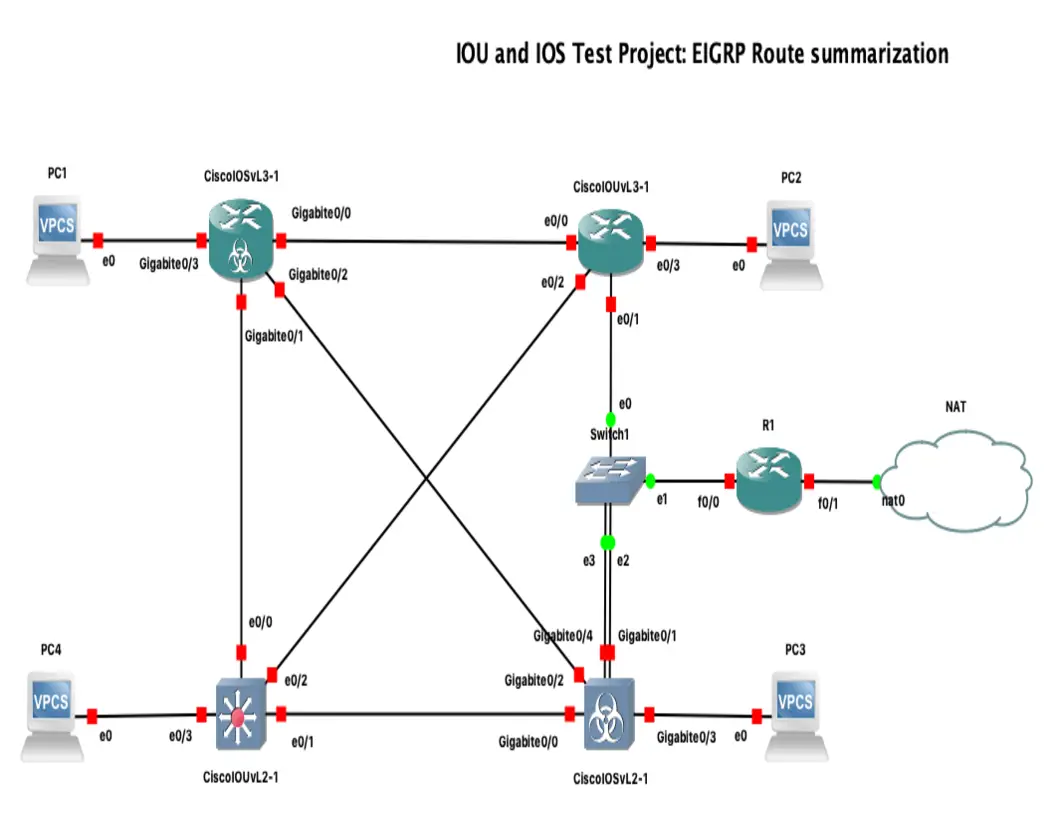
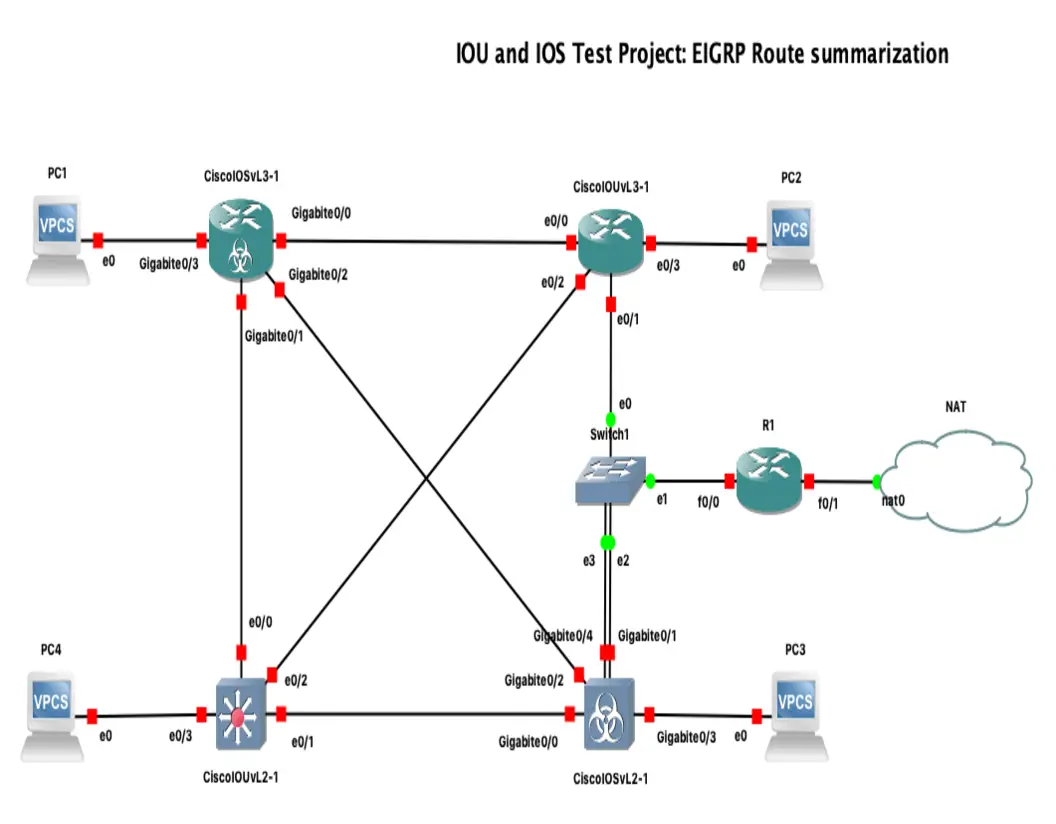
Cisco IOU & IOS Lab: EIGRP Route Summarization and Optimization
This networking project configures Cisco IOU and IOS devices to implement EIGRP route summarization. It optimizes routing tables, reduces unnecessary updates, and improves overall network efficiency by aggregating routes in the EIGRP domain
Why EIGRP Route Summarization Matters
EIGRP route summarization is one of those features that looks simple in a lab but has a big impact in real networks. By advertising a single summary route instead of many specific prefixes, you can shrink routing tables, reduce update size, and limit the blast radius of EIGRP queries during failures.
In both Cisco IOS and IOU labs, summarization is especially useful when you want to model scalable designs and understand how route boundaries affect convergence.
At a high level, summarization helps with:
- Smaller routing tables
- Fewer EIGRP update entries
- Reduced query scope
- Faster and more predictable convergence
- Cleaner hierarchical design
EIGRP does not auto-summarize in modern practice, so any useful summarization is usually configured manually on an interface.
EIGRP Summarization Basics
EIGRP summary routes are typically configured per interface, toward the neighbor that should receive the summary. This is different from protocols where summarization is done globally or at an area boundary.
When you summarize routes in EIGRP:
- The router advertises the summary out a chosen interface
- More specific component routes may remain in the local routing table
- Downstream neighbors receive only the summary, not necessarily every subnet
- The summarizing router installs a route to
Null0for the summary to prevent loops
That Null0 route is important. If traffic arrives for a subnet covered by the summary but the exact route is missing, the packet is discarded instead of looping.
Lab Topology
For this draft, assume a simple topology:
R1connects toR2R2connects to several internal networksR2will summarize those internal prefixes towardR1
Example internal routes behind R2:
10.10.0.0/2410.10.1.0/2410.10.2.0/2410.10.3.0/24
These can be summarized as:
10.10.0.0/22
Example layout:
10.10.0.0/24 \
10.10.1.0/24  \
10.10.2.0/24   R2 -------- R1
10.10.3.0/24  /
              /
Base EIGRP Configuration
Below is a basic classic-mode EIGRP setup in IOS/IOU.
R1
conf t
 router eigrp 100
  network 192.168.12.0 0.0.0.255
  no auto-summary
end
R2
conf t
 router eigrp 100
  network 192.168.12.0 0.0.0.255
  network 10.10.0.0 0.0.3.255
  no auto-summary
end
If you are using loopbacks to represent the internal networks on R2, you could configure them like this:
conf t
 interface Loopback0
  ip address 10.10.0.1 255.255.255.0
 interface Loopback1
  ip address 10.10.1.1 255.255.255.0
 interface Loopback2
  ip address 10.10.2.1 255.255.255.0
 interface Loopback3
  ip address 10.10.3.1 255.255.255.0
end
Verify Before Summarization
Before adding the summary, R1 should learn four separate EIGRP routes.
Use:
show ip route eigrp
Expected output pattern on R1:
D    10.10.0.0/24 [90/...] via 192.168.12.2, GigabitEthernet0/0
D    10.10.1.0/24 [90/...] via 192.168.12.2, GigabitEthernet0/0
D    10.10.2.0/24 [90/...] via 192.168.12.2, GigabitEthernet0/0
D    10.10.3.0/24 [90/...] via 192.168.12.2, GigabitEthernet0/0
You can also verify adjacency:
show ip eigrp neighbors
And topology information:
show ip eigrp topology
Configure EIGRP Summary Route
On R2, apply the summary on the interface facing R1.
For example, if R2 reaches R1 via GigabitEthernet0/0:
conf t
 interface GigabitEthernet0/0
  ip summary-address eigrp 100 10.10.0.0 255.255.252.0
end
That command tells R2 to advertise 10.10.0.0/22 to EIGRP neighbors out that interface.
Verify After Summarization
Now check the routing table on R1 again:
show ip route eigrp
Expected result:
D 10.10.0.0/22 [90/...] via 192.168.12.2, GigabitEthernet0/0
Instead of four routes, R1 now sees one summary route.
On R2, verify the automatically created discard route:
show ip route
You should see something similar to:
D 10.10.0.0/22 is a summary, Null0
This confirms the summarizing router has installed the protective route to Null0.
You can also inspect interface-specific EIGRP details:
show ip protocols
show ip eigrp interfaces detail
What Changes in the EIGRP Topology
Summarization affects what neighbors see, not necessarily what the summarizing router knows internally.
R2 still has knowledge of the more specific routes:
- Directly connected subnets
- Internal topology entries
- Feasible successor information, if present
But R1 now only sees:
- One aggregated destination
- One next hop
- Less detailed topology information for those covered subnets
This matters for troubleshooting. If you summarize too aggressively, upstream routers lose visibility into individual subnet reachability.
Query Containment and Convergence
One of the biggest operational reasons to summarize in EIGRP is query containment.
EIGRP can send queries when a route goes active and there is no immediate feasible successor. In a flat design, those queries may spread widely. In a summarized design, the router advertising the summary can hide internal instability from upstream peers.
That means:
- A failure of
10.10.2.0/24behindR2does not necessarily trigger upstream visibility of that exact loss R1still sees10.10.0.0/22as long as at least one route supporting the summary remains and the summary is configured- Internal reconvergence may happen behind the summarization point
This can dramatically improve stability in larger topologies.
Important Design Caveat
Summarization can also create black holes if you advertise reachability more broadly than reality.
Example problem:
R2advertises10.10.0.0/22- Only
10.10.0.0/24and10.10.1.0/24actually exist - Traffic arrives for
10.10.3.50 R2matches the summary, but no specific route exists- Packet is dropped to
Null0
That behavior prevents loops, but it still means traffic is lost.
To avoid this:
- Summarize only contiguous, logically grouped prefixes
- Place summarization at clear aggregation points
- Verify that the summary aligns with actual addressing plans
- Avoid “wishful” summaries that include unused or remote space unless the design intends it
Manual Summarization Example with Non-Contiguous Networks
Suppose R2 has these prefixes:
10.10.0.0/2410.10.2.0/2410.10.8.0/24
These do not summarize cleanly into a tight block without covering extra address space.
You could still force a larger summary, but that would include unused ranges and increase black-hole risk. In practice, it is usually better to:
- Keep the specific routes
- Redesign the address plan
- Use multiple smaller summaries where possible
Good summarization starts with good IP addressing.
IOU vs IOS Behavior
In most labs, IOU and IOS behave similarly for EIGRP summarization, especially for:
- Interface-based summary configuration
- Summary advertisement to neighbors
Null0route installation- Basic verification commands
Still, keep a few lab realities in mind:
- Feature support can vary by image
- Command output formatting may differ slightly
- Older images may show classic EIGRP behavior more prominently
- Named EIGRP mode may look different from classic mode
If your IOU image supports named EIGRP, the summarization command is still applied under the interface, not under the address-family itself.
Named EIGRP Note
If you use named EIGRP instead of classic mode, the core idea does not change. You still summarize on the interface.
Example structure:
conf t
 router eigrp LAB
  address-family ipv4 autonomous-system 100
   network 192.168.12.0 0.0.0.255
   network 10.10.0.0 0.0.3.255
   af-interface GigabitEthernet0/0
    summary-address 10.10.0.0 255.255.252.0
   exit-af-interface
  exit-address-family
end
Depending on platform and image, syntax may vary slightly, so ? help is worth using in lab.
Useful Verification Commands
These are the commands I use most often when testing EIGRP summarization in IOU or IOS:
show ip eigrp neighbors
show ip eigrp topology
show ip route eigrp
show ip route 10.10.0.0
show ip protocols
show ip eigrp interfaces detail
show running-config | section eigrp
show running-config interface GigabitEthernet0/0
If debugging is needed:
debug eigrp packets
debug ip routing
Be careful with debugs on production devices.
Troubleshooting Checklist
If the summary route does not appear as expected, check the following:
- Is EIGRP adjacency up?
- Is the summary configured on the correct outbound interface?
- Is the AS number correct?
- Are the component routes actually present on the summarizing router?
- Did you accidentally summarize the wrong network or mask?
- Is the interface participating in EIGRP?
- Are you mixing classic and named EIGRP syntax incorrectly?
- Is the lab image missing expected feature support?
A quick method is:
- Confirm specific routes exist on the summarizing router
- Confirm the EIGRP neighbor is established
- Confirm the summary command is under the right interface
- Check the upstream router’s route table
- Verify the
Null0summary route exists locally
Practical Best Practices
For labs and production design alike, these are solid habits:
- Summarize at distribution or edge boundaries
- Match summaries to a deliberate addressing plan
- Use the smallest safe aggregate
- Validate with
show ip routebefore and after - Understand that summaries trade visibility for scale
- Document summarization points clearly
A well-designed EIGRP network is rarely flat. Summarization is one of the tools that turns a working topology into a scalable one.
Final Thoughts
EIGRP route summarization in IOU and IOS is straightforward to configure, but its effects are architectural, not just cosmetic. You are not merely shortening the routing table—you are shaping failure domains, controlling queries, and influencing how much detail the rest of the network can see.
In a small lab, the benefit may look minor. In a larger topology, summarization can be the difference between contained instability and noisy reconvergence across the network.
If you are practicing for certifications, building enterprise-style labs, or reviewing old Cisco routing features, EIGRP summarization is absolutely worth mastering.